
You land in a Tokyo hotel at 11 PM. Jet-lagged. Laptop at 4%. You plug your universal adapter into the wall, connect your USB-C cable, and… nothing charges. Or worse, your phone gets hot enough to fry an egg.
This isn’t bad luck. It’s a mismatch between what your device needs and what your adapter delivers. The global adapter market is flooded with $15 junk that works for a nightlight but not a MacBook Pro. Here’s how to buy the right one without burning your gear—or your money.
Why Your $15 Universal Adapter Is Probably a Fire Hazard
Most cheap universal adapters share one dirty secret: they lack proper surge protection and voltage regulation. They’re a plastic shell with metal pins and maybe a fuse. That’s it.
The real problem isn’t the plug shape—it’s the power conversion. A true travel adapter only changes the physical plug to match the outlet. It does not convert voltage. Your laptop charger handles that. But many cheap adapters introduce resistance, voltage drop, or fail to handle the current draw of a 65W laptop charger.
I’ve seen a $12 adapter melt at a hostel in Chiang Mai. The plastic around the USB port literally deformed. The user was charging a 45W Dell XPS. The adapter was rated for 2.4A total—not enough for that laptop.
Bottom line: If you’re charging anything more expensive than a basic phone, spend at least $25–35 on a reputable brand. Anker, Belkin, and Mogics make adapters that pass safety certifications (UL, CE, FCC). Cheap no-name brands from random Amazon sellers often don’t.
USB-C Power Delivery: The One Spec You Actually Need to Understand
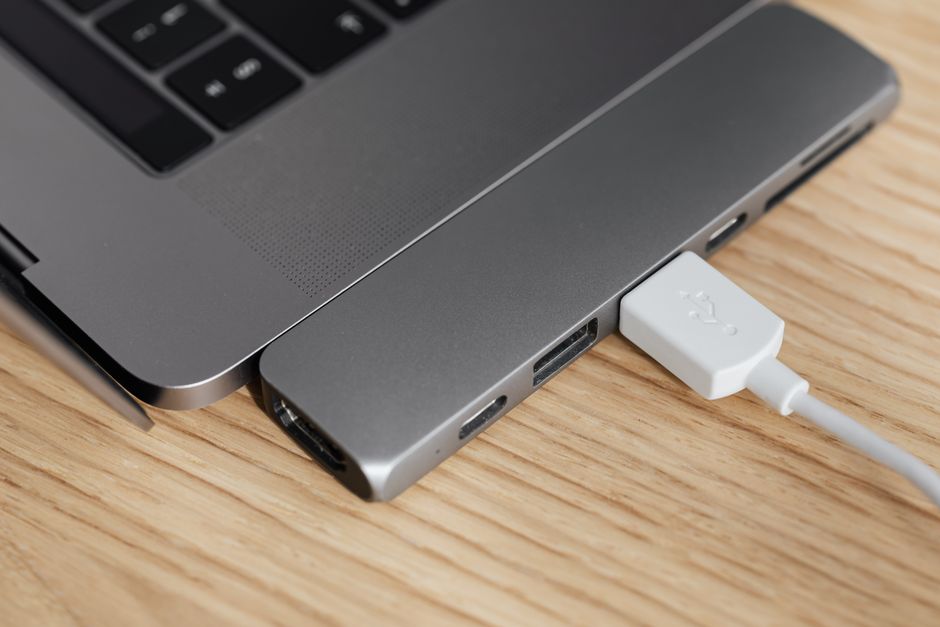
USB-C Power Delivery (PD) is a charging protocol that negotiates voltage and current between charger and device. It’s not just “fast charging.” It’s smart charging.
Here’s the key number: watts (W).
- A phone needs 18–30W for fast charging.
- A 13-inch laptop needs 45–65W.
- A 16-inch MacBook Pro or gaming laptop needs 100W+.
Most travel adapters with USB-C ports claim “PD support” but cap out at 18W. That’s fine for an iPhone 15 Pro Max. It’s useless for a MacBook Air M3, which will charge at a crawl or not at all.
Look for adapters that explicitly state the wattage per USB-C port. If it says “USB-C PD 65W,” that means the port can deliver up to 65W. If it just says “USB-C” with no wattage, assume 15W.
I use the Anker 735 Charger (65W, GaN) with a separate plug adapter head. It’s two pieces but gives me real 65W PD. The all-in-one universal adapters that include USB-C ports rarely deliver more than 30W.
GaN vs. Silicon: Why Size and Heat Matter for Travelers
Gallium Nitride (GaN) is a semiconductor material that allows chargers to be smaller and run cooler than traditional silicon-based chargers. For travel, this is a big deal.
A 65W GaN charger is roughly the size of a deck of cards. A 65W silicon charger is the size of a thick paperback. In a packed carry-on, that space matters.
| Feature | GaN Charger (e.g., Anker 735) | Silicon Charger (e.g., old MacBook brick) |
|---|---|---|
| Size (65W) | ~2.5 x 2.5 x 1.2 in | ~3.5 x 3.5 x 1.5 in |
| Weight | ~150g | ~300g |
| Heat output | Lower (less wasted energy) | Higher (can get uncomfortably hot) |
| Price | $35–60 | $20–40 (older tech) |
For most travelers, a GaN charger with a detachable power cord or plug head is the smartest setup. You buy one GaN charger, then swap the plug head for each country. This gives you real PD wattage without the bulk of a universal adapter.
I’ve been using the Mogics Power Bagel (a universal adapter with a built-in surge protector) paired with a 65W GaN charger. It’s not the cheapest combo (~$70 total), but it’s survived 14 countries without issue.
Plug Types A Through N: The Only Chart You Need
There are 15 plug types globally. Most travelers only need to know four. Here’s the breakdown for 2026:
- Type A/B (North America, Japan, Taiwan): Two flat pins (A) or three flat pins (B). Voltage 100–127V.
- Type C/E/F (Europe, most of Asia, South America): Two round pins (C) or two round pins with grounding clips (E/F). Voltage 220–240V.
- Type G (UK, Ireland, Malaysia, Singapore): Three rectangular pins in a triangle. Voltage 220–240V. Bulky but very secure.
- Type I (Australia, New Zealand, China, Argentina): Two or three slanted flat pins. Voltage 220–240V.
Most universal adapters cover these four types. If you’re going to South Africa (Type M), Israel (Type H), or Brazil (Type N), you need a specific adapter for that country. The “universal” ones often don’t fit these less common sockets securely.
I carry a Skross World Travel Adapter Pro for Type G countries because its UK pins are reinforced and won’t sag in loose sockets. For everything else, I use a simple Type C-to-A plug head.
When NOT to Buy a Universal Adapter
Universal adapters have a dark side: they’re big, heavy, and often fail in one specific use case.
Situation 1: You’re only visiting one country. Buy a single-purpose plug adapter for $5–8. It’s smaller, lighter, and more reliable. Universal adapters add unnecessary bulk.
Situation 2: You need to charge multiple high-power devices simultaneously. Most universal adapters have a single USB-C PD port that drops to 15W when you plug in a second device. If you’re charging a laptop, phone, and camera battery at the same time, get a multi-port GaN charger (e.g., Anker 737, 120W) plus separate plug heads. The universal adapter’s power sharing will leave you with slow charging across the board.
Situation 3: You’re staying in older hotels or hostels with loose sockets. Universal adapters with multiple sliding parts are heavy and can pull loose from a worn-out wall socket. A simple, lightweight single-type adapter stays put better.
Bottom line: Universal adapters are for people visiting 3+ countries on one trip. For single-destination travel, buy the specific plug. You’ll save money and avoid frustration.
Three Common Mistakes That Kill Your Devices
Mistake 1: Assuming “universal” means it handles 100–240V. It doesn’t. The adapter is just a plug shape changer. Your device’s charger must be rated for the local voltage. Check the small print on your charger brick. If it says “Input: 100–240V,” you’re fine. If it says “Input: 110V only,” you need a voltage converter (heavy, expensive, and rarely worth it).
Mistake 2: Plugging a high-wattage device into the adapter’s USB port instead of the AC outlet. Many travel adapters have built-in USB ports that are limited to 2.4A (12W total). Plugging a laptop into that port won’t charge it, and it may overheat the adapter. Use the AC socket for laptops and the USB ports only for phones and earbuds.
Mistake 3: Buying an adapter with a fixed cable. Fixed-cable adapters are harder to pack and prone to cable failure at the strain point. Detachable cable adapters (like the Belkin Travel Adapter with USB-C cable) let you replace the cable if it breaks and pack the cable separately.
My 2026 Travel Charging Setup (No Affiliate Links, Just Honest Picks)
After testing about a dozen combos over three years, here’s what I actually carry:
- Anker 735 Charger (65W GaN, $45): Two USB-C ports, one USB-A. The primary charger for my laptop and phone. Small enough to fit in a jacket pocket.
- Mogics Power Bagel ($30): A universal adapter with a short detachable cable and surge protection. I use it as the plug interface for my Anker charger. It also has two standard USB-A ports (2.4A each) for backup.
- Two USB-C to USB-C cables (1m and 2m): Anker PowerLine III. Rated for 100W. Cheap cables can’t handle high-wattage PD and will heat up or fail.
- One USB-C to Lightning cable (for older devices): Apple or Anker, 1m.
Total cost: about $100. Weight: under 300g. I can charge a MacBook Pro 14-inch at full speed, two phones, and a pair of AirPods simultaneously. I’ve used this setup in Japan, Thailand, Germany, the UK, and Australia without a single issue.
If you’re on a tighter budget, the Belkin 60W GaN Travel Charger ($35) is a solid alternative. It’s slightly bulkier but includes a built-in UK plug that folds out, saving you from carrying a separate adapter for the UK.
This is not financial advice. Your charging needs may differ. But if you buy one of these setups, you won’t be searching for a replacement adapter at 11 PM in a foreign hotel.